Grocery lists
One grocery list for the whole week, minus what you already have
Three chicken dinners shouldn't mean three separate lines for chicken. cookingplan.app combines every ingredient across the dinners you pick into one line each, then subtracts what's already in your kitchen.
Free during early access · no card · standard, vegetarian & vegan
How it works
- 1
Plan your dinners
Add dinners in the Meal planner on the days you'll cook, with the servings each one needs.
- 2
Pick your shopping dates
Open Groceries, choose From and To, and press Make list — or press Shop for these in the Meal planner.
- 3
Shop by aisle
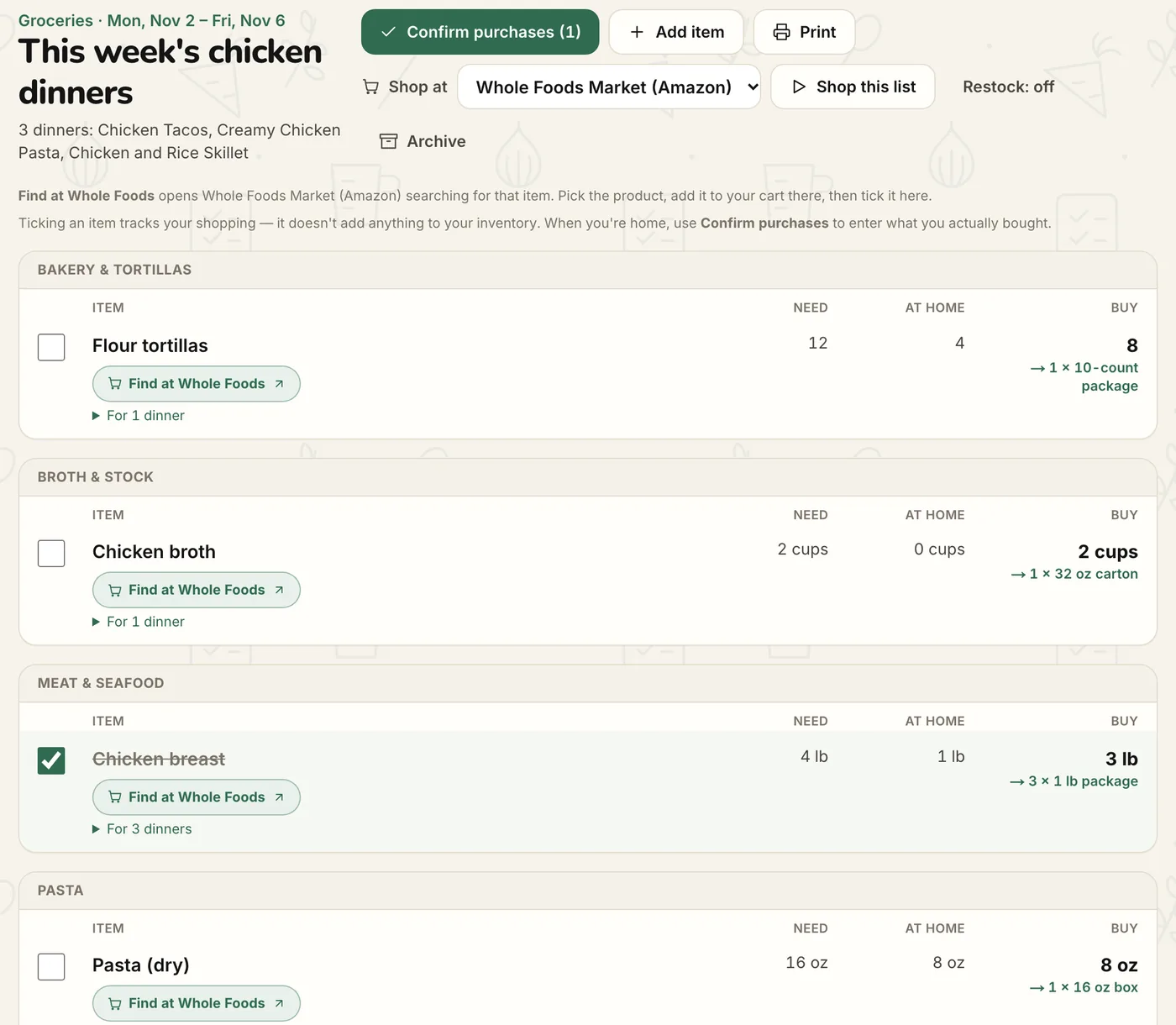
Lines are grouped by aisle with Need, At home and Buy. Tick items as they go in your cart, print the list, or open each item at Whole Foods or Walmart.
- 4
Confirm what you bought
Back home, press Confirm purchases to add what you actually bought to your inventory — exactly once, even if you tap twice.
Combined once, not recipe by recipe
Amounts are added across every dinner in the dates you chose and converted to one unit, so 500 g plus 0.5 kg becomes a single line of 1,000 g. Different forms stay separate — raw rice and cooked rice never merge.
Tap For 3 dinners under any line to see which dinners need it and how much each one uses.
Rounded to real packages
When the package size is known, Buy is rounded up to whole packages after combining, and both numbers are shown: need 8 tortillas, buy one 10-count package. If the size isn't known, you see the exact amount instead.
Shop at Whole Foods or Walmart
Choose a store in Shop at and every line gets a Find at … button that opens that store already searching for the item. Shop this list walks you through the list one item at a time.
With Walmart, Price my list at Walmart picks the product that covers each amount for the least money and opens Walmart with them in your cart. You check out on the store's site — cookingplan.app never orders or pays for anything. cookingplan.app may earn a commission on Walmart purchases made through these links, at no cost to you.
When plans change, the list follows
Change a dinner after making the list and it recalculates. Your ticks and extra items stay, and lines whose amounts changed are marked so you can check them.
Questions
Can I add things that aren't in a recipe?
Yes. Add item puts extras like paper towels or coffee on the list. They stay separate from recipe ingredients and appear once.
Does ticking an item add it to my inventory?
No. Ticking only tracks your shopping. When you're home, use Confirm purchases to enter what you actually bought — package sizes often differ from what recipes need.
Can it keep my staples stocked too?
Yes. Give an item a restock target and turn on restock mode for the list. It then buys enough to bring you back to that target after the planned dinners, as one combined amount instead of a second line.
Can I get my groceries delivered?
cookingplan.app opens Whole Foods Market (on Amazon) or Walmart with your items so you can choose delivery or pickup there. It never places orders or pays for anything itself.
How much does cookingplan.app cost?
It's free during early access — no card and no trial clock. Every household gets the larger Household limits while early access lasts.